

Foldable/Accordion Menu



Collapsible section is good for hiding or showing extra content, such as filter options, menus, or details. With CSS along with simple JavaScript you can create collapsible section that is interactive, accessible, and responsible.
On this products list page, I added a collapsible side section that has an accordion menu inside. User can toggle them to reveal or hide the section and when it is toggled to hide, user can see bigger pictures of products.

Accordion menu with multiple selection options is commonly used for filtering the items and it only requires simple small size vanilla JavaScript. But with proper design and implement it empowers users to get the desired result easily and effectively. Also it saves users scrolling.


It gives users the options to fold or open the section where users can see bigger and more items when the side menu is folded up. On mobile screen this function saves even more space as it is placed as a simple icon and when the icon is clicked, it brings the full screen size layer retrieving the arccordion menu.
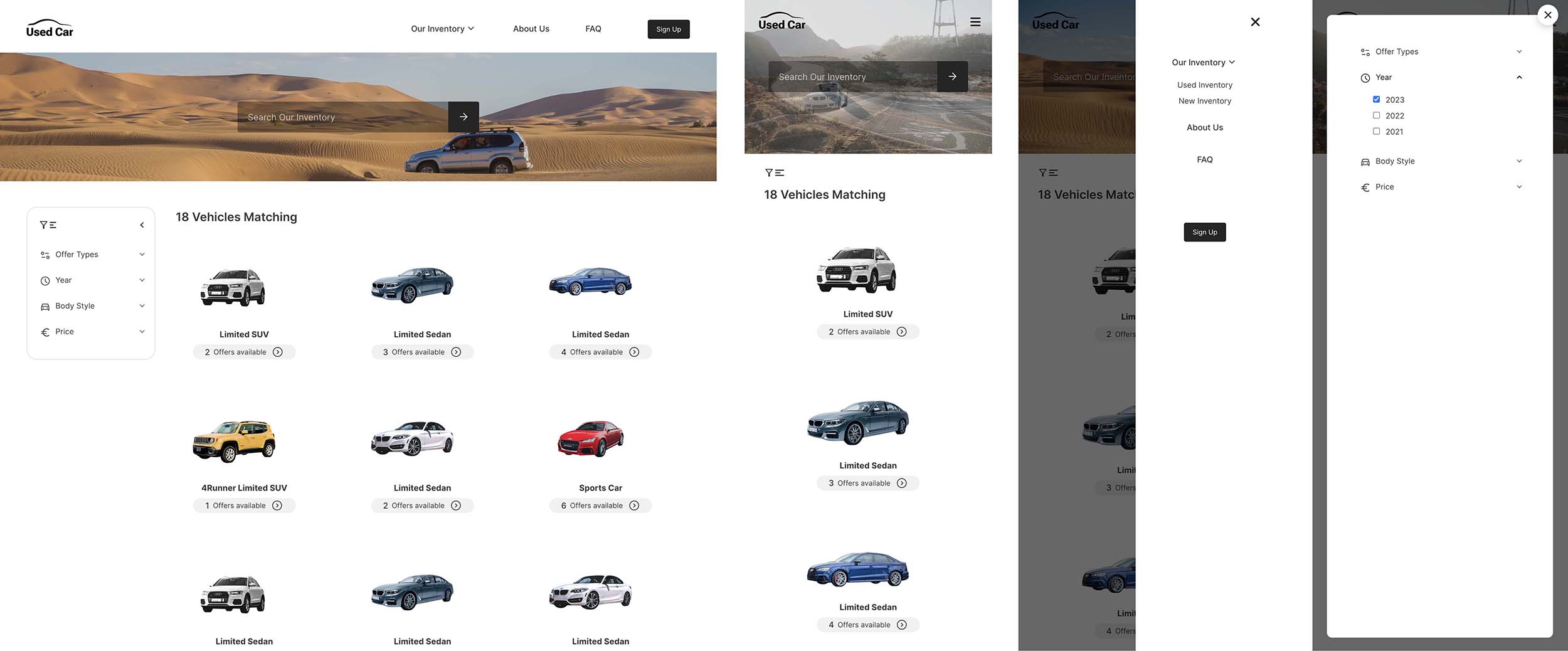
To give a visual engagement I used a CSS transitioning on background image. It does offer some visual leads about the page but not distract too much when users search for the products. When user hovers over a specific product, it also pops out scaling up and the rest itmes a little bit fade out to make the more engaging interaction for users.